Furniture pop-in: an empty room that furnishes itself.
Furniture pop-in is a template in RoomGen Studio’s Reels tool. It opens on your room with the furniture taken out, then fills it back up piece by piece in a playful stop-motion style until your finished render is back in full. You approve one frame, you get one four-second vertical clip, and it suits a room whose furniture is worth watching arrive.
Updated · RoomGen Studio
What a furniture pop-in reel shows
A furniture pop-in reel opens on your room with the furniture taken out and ends on your finished render. In between, the pieces arrive one after another with the playful feel of stop-motion, so the viewer watches the scheme come together rather than being handed it. In the preview below, the ceiling track, the floor and the light stay put while the furniture turns up.
The appeal for a designer is that the before needs no explaining. Everyone knows what an empty room looks like, and the pleasure is in watching it fill. The clip only brings in what your render contains and ends on the render itself, so the last frame is the scheme your client approved, not a loose version of it. That is the reason to start from a render you trust rather than from scratch.
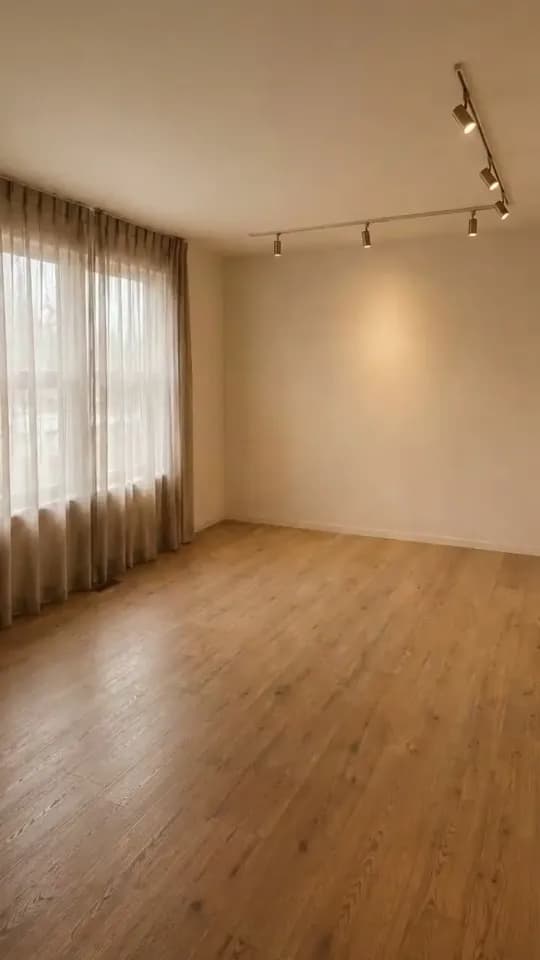
Empty room
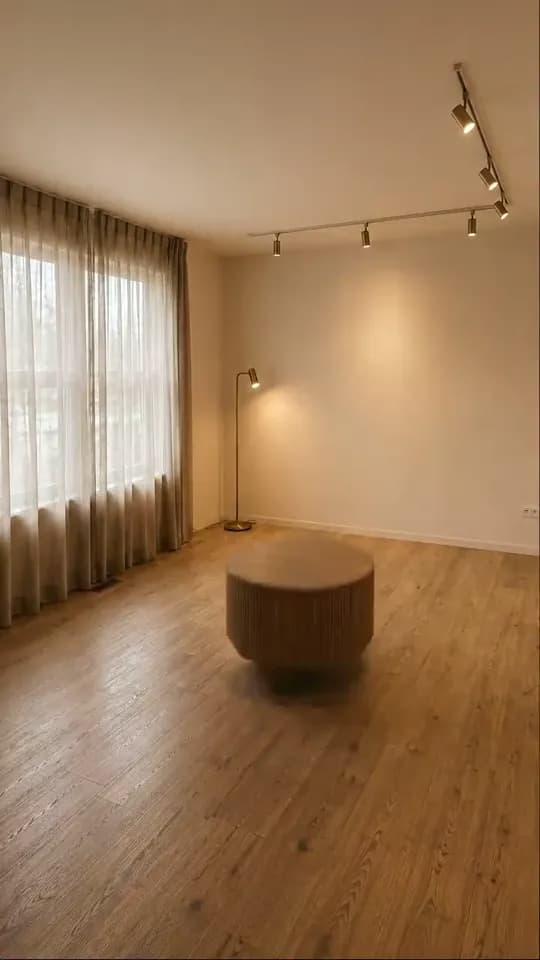
Pieces appearing
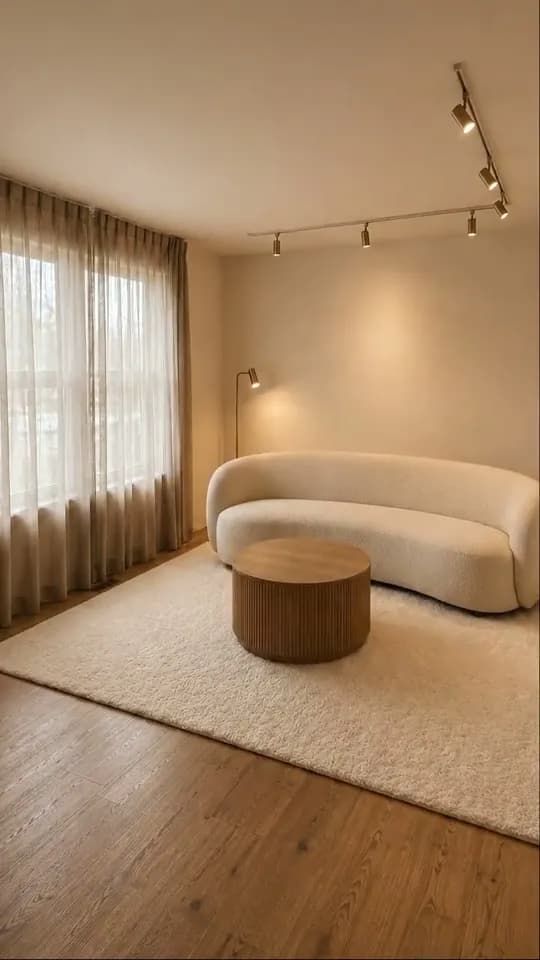
Furnished
Pop-in or another reel template: which to choose
All four templates below end on your finished render. What differs is where the room starts, how it gets to the render, and what the clip suits.
| Template | How the room fills | Clip | Best for |
|---|---|---|---|
| Furniture pop-in | Your room emptied of furniture, then the pieces arrive one after another | One 4-second clip, 720p or 1080p | Furnishing-led schemes and home staging |
| Unboxing | A single white box in the emptied room opens, and the room assembles out of it | One 4-second clip, 720p or 1080p | Project launches, a new furniture edit, a staging announcement |
| Furniture flies in (fly-in) | The room emptied of furniture, curtains and hanging lights; everything travels in and lands | One 8-second clip at 720p | Schemes where curtains, a chandelier and a rug carry the design |
| Renovation reveal | A tired before frame, then construction, then your render | Two 4-second clips stitched into about 8 seconds, 720p or 1080p | Kitchens, bathrooms and refurbishments where the building work is the story |
Pop-in is the plainest of the furniture templates. Unlike Unboxing, there is no box to open, just your room and your furniture arriving. Fly-in also takes out the curtains and hanging lights and brings them back in. In the pop-in preview the curtains and ceiling track are already in the empty room; the sheers billow for a moment, but what arrives is the furniture. Pop-in is the shorter clip as well: four seconds at 720p or 1080p, against fly-in’s eight seconds at 720p. Choose pop-in when the pieces are the point, and fly-in when the curtains and a chandelier are part of the show. When the change is in the fabric of the room rather than what stands in it, a renovation reveal tells the story better.
Which renders make a good pop-in
Pick a render where the furniture is the story. The template is about arrivals, so it needs pieces worth watching arrive: a sofa with a strong outline, a sculptural table, a rug that changes the floor, a lamp standing clear of the wall. The preview room has four such pieces, each large enough to read at the size of a phone screen.
Fewer, larger pieces beat many small ones. Your reel is one four-second clip, half the length of the preview above, so it has less time for arrivals than the preview suggests. A room with a dozen accessories on its shelves turns into a flicker rather than a sequence. If you have two renders of the same scheme, reel the one with the clearer furniture group and keep the heavily styled version for stills.
Show the floor. Each piece settles somewhere, and that moment is the satisfying part. A render cropped at seat height, or one where the floor is lost in shadow, hides it. A vertical frame wants floor in the lower third, the furniture group through the middle and something at ceiling height at the top.
Then check the crop. Every reel is 9:16, and a landscape render is centre-cropped to fit. From a 16:9 image that keeps roughly the middle third of the width, so a sofa pushed to the far left of a wide render will not make it into the reel. Cover the outer thirds with two fingers: if the furniture group is still there, the render will work. The guide to interior design reels from a render covers the crop, and what survives it, in more detail.
If the scheme is not signed off yet, you can skip the crop altogether: make the render at 9:16 with the proportion picker and start the reel from that version.
How to make a furniture pop-in reel in RoomGen Studio
The flow is short: a template, a render, then a four-step wizard that runs Frames, Settings, Generate and Result.
- Open Reels and choose Furniture pop-in. The Reels tool sits in the Video group of the sidebar. Pick the template from the panel, or press Expand to see the full template library at full size first.
- Pick the render. This is the room viewers will be left looking at, so choose the version you would send a client.
- Make and check the Empty room frame. The Frames step has one still to fill, the Empty room: your finished room with all furniture and decor removed. Your render follows it as the Final reveal, which is where the video always ends. The Empty room card opens as not generated yet, so first press Generate (150 credits), or choose Use my own to add an empty still from the Gallery or an upload for free. Then look at it closely. If something is off, regenerate it with a short instruction or swap in your own still. Press Confirm frame when it matches.
- Choose the settings. Pick Fast or Quality, and 720p or 1080p. There is no length to set, because the reel is one four-second clip. 720p is plenty for a phone feed; 1080p is worth choosing for a website or a meeting-room screen. The Generate button shows the exact credit total, and the chip beside it shows how many reels at that price your balance can pay for.
- Generate and collect. The finished MP4 saves to the project Gallery, ready to download. Captions and music go on in whichever app you post from.
If you close the wizard partway through, Reels offers a resume card when you come back, and work already paid for is kept.
What a pop-in reel costs
You pay for two things: the Empty room frame, if the studio generates it, and the clip. A generated Empty room frame costs 150 credits, and each regeneration adds another 150; your own still is free. The clip price depends on the tier and the resolution. At 720p Fast is cheaper than Quality, while at 1080p the two tiers cost the same.
Prices can change, so go by the Generate button, which shows the exact total before you commit. Nothing is spent on video until you press it.
Getting the Empty room frame right
The Empty room frame is the only still you approve. The clip runs from it to your render, so it decides whether the reel reads as one room.
Check it for continuity rather than beauty. The camera should sit in the same place, the window and ceiling line should not move, and the floor should be the same floor with the boards running the same way. Watch the light as well. If the empty room is brighter or cooler than the render, the clip will look as if the sun moved while the furniture arrived.
Then decide what counts as the room. In the preview, the curtains and the ceiling track are already there in the empty frame, and the lamp, table, sofa and rug are what arrive. Your render may raise the same question about a pendant, a built-in bench or a rug you would rather keep down. If the empty frame takes out something that belongs to the architecture, or leaves in something you want to see pop in, regenerate it. Short, physical instructions work best, such as “keep the curtains” or “keep the rug”.
Your own still is free, and if the render began as a photo of a real vacant room, that original photo can be the best start frame you have, provided it is framed exactly like the render. If all you have is a furnished photo of the space, clearing the furniture out of the photo gives you an empty shot from the same viewpoint. Treat it as a close approximation: the wall and floor that were hidden behind the furniture are filled in, not photographed.
Where a pop-in reel earns its keep
The obvious home is a feed. Instagram Reels, TikTok and YouTube Shorts are all vertical, and a pop-in reel has its hook built in: the empty room asks a question and the last second answers it. Preview the post in the app before it goes out, because each app lays its own buttons and captions over the frame and text near the top or bottom edge can disappear under them. If the app lets you choose a cover image, choose the furnished room.
It also works one to one. Sent to a client ahead of a presentation, a short clip of their own room filling with the proposed pieces sets up the scheme before you walk them through it. The clip and the presentation then end on the same image.
For home stagers and estate agents (real estate agents in the US), pop-in is a clear way to show what staging does for a vacant room. Present it as design intent rather than a record of the property: the furniture is not included and was never there, and a generated empty frame is not a survey of the room either. Label it as you would a staged still, and use the real listing photo as the start frame when you have it. The same care runs through virtual staging for home stagers.
For a launch, one pop-in per room makes a short series. It might be a new collection shown in a room, a show flat or model unit opening, or a studio announcing a finished project. The series holds together because every clip follows the same rhythm.
What furniture pop-in will not do
It will not document real work. A pop-in reel shows a scheme arriving, not an installation, so keep it away from anywhere a viewer could take it as a record of what was delivered.
It will not fix a weak render. The reel ends on your render as it is, so a sofa slightly too big for its wall becomes the frame people remember. Sort out scale and proportion in the render before you reel it.
It will not let you place each arrival by hand. You set where the reel starts, and it ends on your render; the pieces arriving in between are generated, so watch the whole clip at full size before you post it. There is no redo button on a finished reel, and the common questions below cover trying again.
It also adds no sound or text. The result is a clean MP4, and the music, captions and overlays belong in the app you publish from.
Run the free sample project before your own room
The sample project runs the whole flow free as a demo. Every new account starts with one, named Tutorial, in its projects: open it and choose Reels in the sidebar. It is the easiest way to see the Frames step and a finished pop-in before you spend credits on your own room. After that, pick the render whose furniture group survives the crop, check the Empty room frame against it, and make one.
This guide is kept by the RoomGen Studio team and describes the Reels tool as it works on 28 September 2026. There is more about who makes the studio on the about page.
Common questions
How much does a furniture pop-in reel cost?
It comes in two parts: 150 credits each time the studio generates the Empty room frame (your own still is free), plus the clip, which is priced on the Settings step by tier and resolution. At 720p Fast is cheaper than Quality; at 1080p the two tiers cost the same. Prices can change, so go by the Generate button. It shows the exact total before anything is spent on video, and the chip beside it shows how many reels at that price your balance can pay for.
Can I use a photo of the real empty room as the start frame?
Yes. On the Frames step you can use your own still from the project Gallery or an upload instead of generating one, and it costs nothing. It needs to match the render’s camera position and framing closely. The clip runs from that still to your render, so any mismatch shows up as the room shifting. For a staged vacant listing, the original photo is usually the most honest start frame you have.
How long is a furniture pop-in reel, and what shape is it?
One four-second clip, in 9:16 vertical at 720p or 1080p. There is no length setting, so if a room has more to show than four seconds allows, the answer is fewer pieces in the render rather than a longer clip. A landscape render is centre-cropped to fit, so keep the furniture group in the middle third of the width, or make a 9:16 render first and start the reel from that.
What if a piece arrives wrong in the finished reel?
A finished reel has no redo button, so watch it at full size before you post it. To try again, start a fresh pop-in run from the same render. You confirm the Empty room frame again, at the same cost to generate or free with your own still, and the clip is charged again at the price the Generate button shows. If the fault began in the empty frame, such as a piece left behind or part of the room taken out, fix the frame before you generate. Retry only appears when a clip fails outright rather than finishing.
Can I use a pop-in reel on a property listing?
Yes, as long as it is presented as what it is: a picture of how the room could be furnished, not a record of the property. The furniture is not part of the sale. Label the clip as virtually staged wherever you would label a staged still, and follow the disclosure rules of the market you sell in. Starting from the real empty photo keeps the opening frame true to the room buyers will actually walk into.
Try it on your own plan
Upload a floor plan or a room photo and see the first renders in about thirty seconds.
100 free credits · no credit card required
Get the next guide when it lands
We publish these as we work through what people actually ask about pricing, staging and turnaround. Leave an address to hear when a new one goes up.