A furniture fly-in reel: the room that dresses itself.
Furniture flies in is a template in the Reels tool in RoomGen Studio. It opens on your finished room with the furniture, decor, curtains and hanging lights taken out. Then the curtains draw, the chandelier lowers, the rug unrolls and each piece glides in to land where your render has it. The clip ends on the render itself. You get one eight-second vertical reel, with one frame to check before anything is spent on video.
Updated · RoomGen Studio
What the furniture fly-in reel does
Furniture flies in, the template behind a furniture fly-in reel, suits a scheme whose soft furnishings and lighting matter as much as its furniture. You give it one finished render. It gives you one frame to review, called Empty room: your room with its walls, floor, ceiling and windows kept, and everything you dressed it with taken out. A single clip then plays from that frame to your render. The viewer watches the room being dressed, rather than a before and an after.
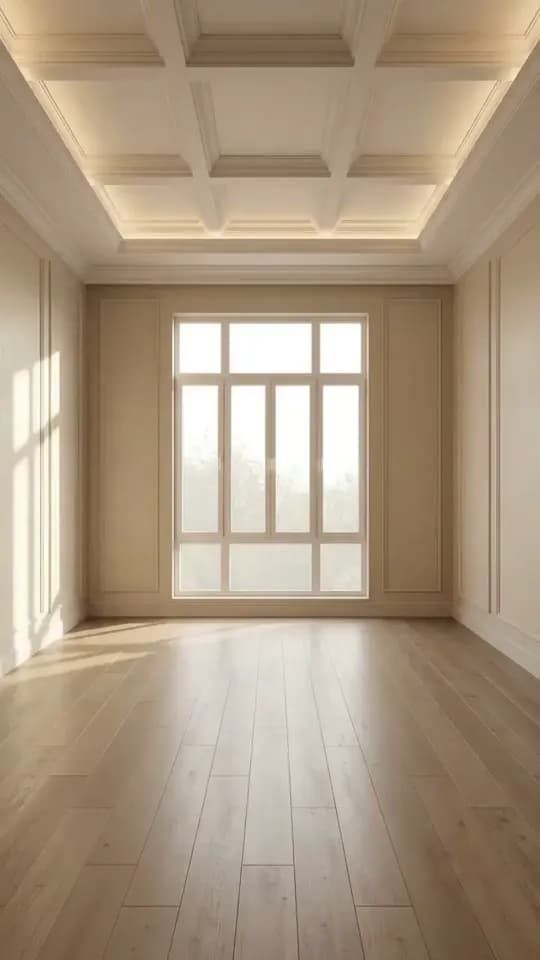
Empty room frame
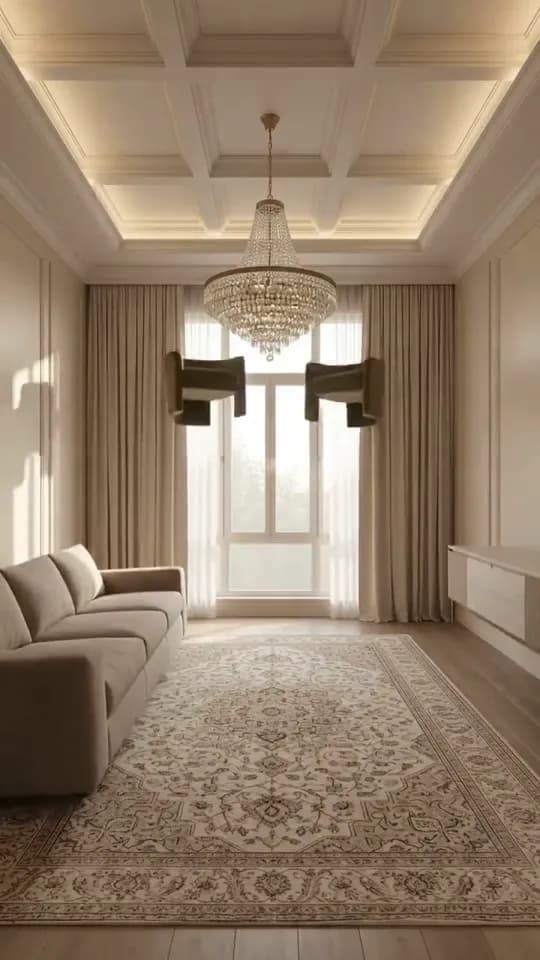
Mid-clip
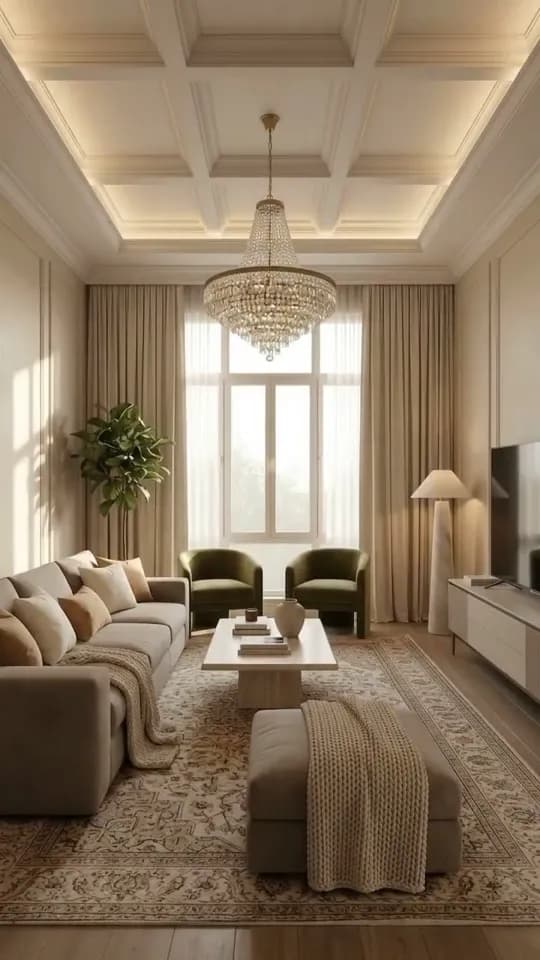
Finished render
The ending is what matters for your business. The clip is built to bring in only what your finished render contains. So the armchairs that land should be the ones you specified, in the colour you chose, under the chandelier from your scheme. It closes on the render your client has already seen, cropped to vertical if it was landscape. Starting from a render you have signed off is what keeps the room consistent from the first frame to the last.
Fly-in, pop-in or unboxing: which reveal suits the scheme
All three templates start from your room emptied and end on your render. What differs is how the room fills, and what the viewer is invited to watch.
| Template | How the room fills | Frames and clip | Best for |
|---|---|---|---|
| Furniture flies in | Pieces travel in and land; the curtains draw, the hanging light lowers, the rug unrolls | 1 frame to check (Empty room); one 8-second clip at 720p | Schemes carried by soft furnishings and lighting |
| Furniture pop-in | Piece by piece, in a stop-motion rhythm | 1 frame to check; one 4-second clip, 720p or 1080p | Furnishing-led schemes, home staging |
| Unboxing | The furniture comes out of one white box at the centre of the floor | 1 frame to check; one 4-second clip, 720p or 1080p | Launches, handovers, the close of a presentation |
Choose fly-in when the soft furnishings and the lighting carry the design. A scheme built around a statement chandelier, full-length curtains and a patterned rug gets a beat for each of them. The draw, the descent and the unroll are what set this template apart from the other two. Pop-in and unboxing are about the furniture arriving; fly-in is about the whole room being dressed. Fly-in is fixed at 720p, so if the clip must be 1080p, use one of the other two.
If the floor and walls are part of your work too, the Room builds itself template starts from a bare shell instead and plays the finishes in as well as the furniture.
Renders that fly in well
Choose a render with something to happen at every height. On a 9:16 screen the top, the middle and the bottom of the frame each have a job, and each beat of the clip needs something in the render to carry it.
- A hanging light worth lowering. A chandelier, a cluster of pendants or a large shade gives the top of the frame its moment. A render lit only by built-in lighting, like the cove light in the preview ceiling, has nothing to lower.
- Curtains that fall the full height. Floor-length curtains either side of a tall window make the draw easy to follow. A window with no curtains in the render leaves that beat out.
- A rug with pattern. The rug fills the bottom third of a vertical frame, and a pattern makes the unroll readable on a phone. A plain rug close to the colour of the floor unrolls almost unseen.
- Furniture with a silhouette, and floor to land on. A sofa, a pair of armchairs and a coffee table read clearly as they glide in. Leave open floor between them in the render. In a room packed wall to wall, the pieces overlap on screen and their arrivals are hard to follow.
Styling comes late. In the Mid-clip frame of the first figure there is still no coffee table, ottoman, fig tree, floor lamp, television or cushions. All of them arrive after that point, so the closing moments are where the detail lands. Cushions and throws that read at phone size give that ending something to show. A shelf of small objects mostly does not.
Two rules apply to a fly-in reel. First, keep the scheme in the middle third of the width, because a landscape render is centre-cropped to 9:16. Second, keep the architecture legible, with the windows, the ceiling line and the floor plainly readable, so you can check that the Empty room frame shows the same room.
The preview is a good pattern to copy. It shows a long room seen from one end, with the window centred on the far wall, the chandelier at the top of the frame and the rug running out at both sides. The guide to interior design reels from a render covers the vertical crop in more detail.
How to make a furniture fly-in reel in RoomGen Studio
The flow is short: a template, a render, then a four-step wizard that runs Frames, Settings, Generate and Result.
- Open Reels and choose Furniture flies in. The Reels tool sits in the Video group of the sidebar. Pick the template from the panel, or press Expand to see the full template library at full size.
- Pick the render. Choose the one finished render the reel should end on, ideally the one you would close a presentation with.
- Check the Empty room frame (Frames step). Review it closely. Then confirm it, regenerate it with a short instruction, or supply your own still from the Gallery or an upload. A generated frame costs 150 credits each time; your own still is free.
- Confirm the price (Settings step). There is nothing to set, because the format is fixed. The Generate button reads “Generate video · N credits”, the exact total, and the “N left” chip beside it shows how many reels at that price your balance can pay for.
- Generate, then Result. The finished MP4 saves to the project’s Gallery, ready to watch and download. Captions, music and text overlays go on in the app you post from.
Nothing is spent on video until you press Generate, so the Frames step is the place to take your time. If you close the wizard partway through, the Reels tool offers a resume card when you return, and work already paid for is kept. The Reels tool is on paid plans.
Checking the Empty room frame before you spend
The clip moves from exactly the Empty room frame to your render. So the frame decides whether the reel reads as one room being dressed or as two rooms blending. Hold it next to the finished render and check four things:
- the windows sit in the same place and at the same size, with the same number of panes (a window that differs will appear to redraw itself partway through the clip);
- the ceiling line, the corners and any panelling or mouldings match, so the viewpoint has not shifted;
- the floor is the same floor, with the boards running the same way;
- every piece that should fly in is really gone, with no lamp, plant or side table left behind.
Then decide what counts as the room and what counts as the dressing. In the template’s own preview, the panelling, the coffered ceiling and its cove lighting stay in the Empty room frame, while the curtains and the chandelier go. You can move that line. Regenerate with a plain instruction such as “keep the rug”, and the rug is down from the first frame. Each regeneration costs the same as a new frame, and anything you keep loses its entrance: a rug already in place has nothing to unroll.
You can also supply your own Empty room frame from the Gallery or an upload. It has to line up with the render, showing the same room from the same viewpoint, or the clip looks like a cut to somewhere else. If your render began as a photo of the real room, clearing the furniture out of that photo gives you an empty frame from that viewpoint. The clearing is a separate paid edit, so it is not a free route to the frame.
That route only suits a render that kept the room’s existing finishes. The Empty room frame is your finished room. If the design changed the paint, the flooring or the panelling, an emptied photo of the room as it stands would have those surfaces change mid-clip. The reel would then read as a renovation rather than a room being dressed.
If the finished reel is not right
Watch the result at full size before it goes anywhere. Generated video can slip even from a well-matched frame, but most faults point back to something you can change on the next run:
- Pieces overlap or land out of place. The render is probably packed wall to wall. Leave open floor between the main pieces, as set out under renders that fly in well.
- The walls, window or ceiling move. The Empty room frame does not quite match the render. Run the four checks under checking the Empty room frame, or supply your own still that lines up with the render.
- A piece is in the room from the first frame. If you did not ask to keep it, the Empty room frame left it behind. That is the last of the four checks.
- A piece you wanted never arrives. It was not in the render. The clip only brings in what the render contains, so add the piece to the render first.
A clean frame and a well-spaced render lower the risk of these faults, but they do not remove it. Something appearing that your render does not have is the clip slipping, and the only remedy is a new run.
A finished reel has no redo button. The Result step hands you the video to download, and trying again means starting a new fly-in reel on the same render. That is a fresh run. You confirm the Empty room frame again, generated for 150 credits or your own still, and the video is charged again at the price the Generate button shows. The Generate step offers Retry only when the clip fails outright rather than finishing.
Where a fly-in reel earns its place
Anywhere the story is a room coming together. The empty frame poses the question and the dressed room answers it. The movement in between gives a scrolling viewer a reason to stay to the end.
- Social posts. A finished scheme on Instagram Reels, TikTok or YouTube Shorts that needs no explanation. One room makes one post, so a project with several renders becomes a short series. Preview the post in the app before it goes out, so any text you add is not hidden under the app’s own buttons.
- Client presentations. Open a concept meeting with it before the boards and the schedule, or send it after sign-off. It closes on the scheme they approved, so it confirms the decision rather than reopening it.
- Home staging. An empty room furnishing itself is the staging pitch in one short clip, which suits stagers showing what a vacant room could become.
- Furniture and lighting launches. A maker or showroom can show a collection arriving in a room, with the chandelier or the sofa given its own entrance.
Listings need care. Every piece in a fly-in reel is proposed rather than present, and none of it comes with the house. Label the reel as virtual staging or a design proposal, and take the same care as with AI video on property listings.
What the fly-in template will not do
It will not change your design. The reel ends on your render as it stands, so a missing lamp or the wrong curtain colour has to be fixed in the render first.
It is also fixed by design: one clip, one order, with no way to slow a beat or reorder the arrivals. That keeps it quick to make and consistent across a series. For a whole apartment, make one reel per room.
And it is design intent, not a record of an install. Nobody believes a sofa glided across a room on its own, which is part of the charm. A viewer can still read the finished room as a job that was delivered, though. Show the reel as a proposal, and keep photographs of completed work for claims about completed work.
Try it on the sample project first
The sample project runs the whole flow free as a demo, so you can walk through the Frames step and the rest of the wizard before you spend credits. Then run it on the render in your portfolio with the most to dress: a hanging light, full-length curtains and a rug. If the project is a renovation, a renovation reveal reel plays a before, a construction stage and your render instead. You can supply your own before photo. Show it as design intent, not a record of the works.
This guide is kept by the RoomGen Studio team and describes the Reels tool as it works on 28 September 2026. You can read more about RoomGen Studio and how the team works.
Common questions
How long is a furniture fly-in reel?
Always eight seconds, as one 9:16 vertical clip at 720p that runs from the Empty room frame to your finished render. There is no length or resolution setting. If you need 1080p, Furniture pop-in and Unboxing, the closest templates, offer it in four-second clips.
Can I keep some pieces in place while the rest fly in?
Yes. On the Frames step, regenerate the Empty room frame with a short instruction that names the piece, such as “keep the curtains”. That piece is then in the room from the first frame, and everything else still arrives. A kept piece gets no entrance of its own, and each regeneration costs 150 credits, so decide what stays before you ask.
Will the reel add furniture that is not in my render?
It is built to bring in only what your finished render contains, so the pieces that land should be the ones you designed. The clip also ends on your render. The flip side is that anything missing from the render will not fly in, so settle the scheme before you start. Generated video can still slip, so watch the finished clip once at full size before you post it.
How much does a furniture fly-in reel cost?
The Empty room frame costs 150 credits each time it is generated, or nothing if you use your own still. The video is priced on the Settings step: the Generate button reads “Generate video · N credits”, the exact total, and the chip beside it shows how many reels at that price your balance can pay for. Prices can change, so go by the button.
Can I use a fly-in reel on a vacant property listing?
Yes, if you label it as virtual staging or a design proposal and follow the disclosure rules of the market you sell in. The furniture, curtains and lighting in the clip are proposed rather than present, and none of them come with the property. Keep the reel apart from the photographs of the rooms as they stand, so no buyer mistakes it for a record of what they will view.
Try it on your own plan
Upload a floor plan or a room photo and see the first renders in about thirty seconds.
100 free credits · no credit card required
Get the next guide when it lands
We publish these as we work through what people actually ask about pricing, staging and turnaround. Leave an address to hear when a new one goes up.