Describe a room, get the image back.
Type the change you want into the box on the home screen, with a photo of the room attached to the same message, and the restyled picture comes back as the next message in the thread. The conversation runs the studio's own styling tools, so a sentence is a way into them rather than a looser substitute for one.
What the chat does with a sentence
It picks one of the studio's styling tools, runs it, and puts the finished image in the thread. The reply is not a description of what you could do next. By the time the picture appears, the work is done.
The handoff is deliberately narrow. A turn can end with a machine-read line naming a tool and its settings, which the studio resolves against the same catalogue the tool screens use, then builds the same instruction that tool's own form would have built. Anything it cannot resolve is dropped: a tool name that does not exist goes nowhere, and an instruction still carrying an unfilled blank is refused rather than sent to the image model and charged for. What you type steers a known tool. It does not become the prompt.
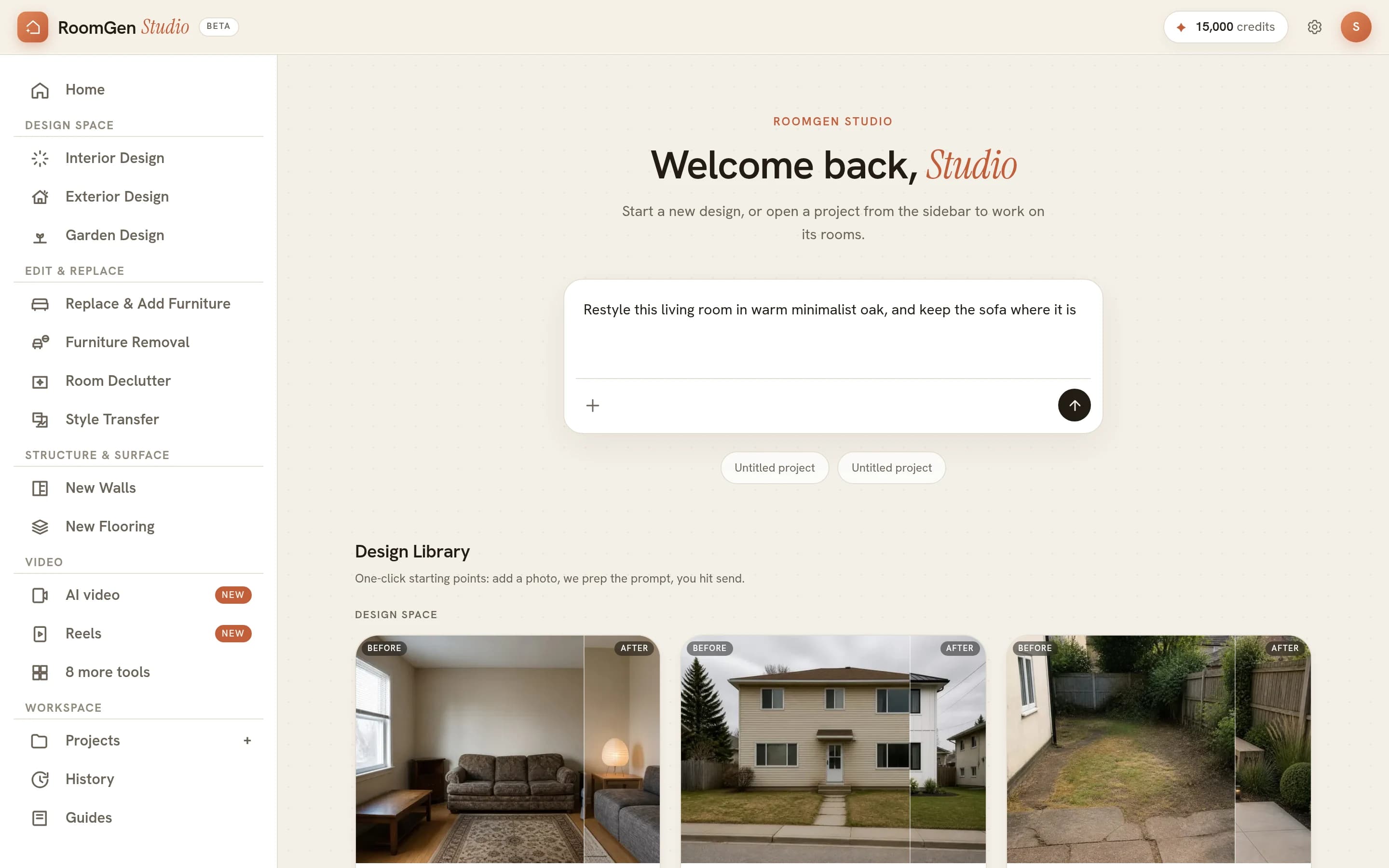
Attach the room to the message that asks for the change
A render needs a photo on the same message that asks for it. Every one of these tools transforms an image, and the studio only ever hands a tool the pictures that travelled with the message that triggered it. A photo you sent eight turns ago will not be picked up, which is the point: without that rule, a later request could fire a render on a picture you had stopped thinking about.
The plus sign at the foot of the box attaches up to four images, and pasting one in works too. Questions are the exception, and they are worth knowing about: with no photo attached the assistant still answers on palettes, materials, lighting, proportion and what a budget buys. Nothing renders, so nothing is charged.
The example in the screenshot above is a fair template for the sentence itself. Restyle this living room in warm minimalist oak, and keep the sofa where it is names the room, names the change, and pins the one thing that must not move. That last clause does most of the work, because the difference between a useful render and a different room is almost always something you did not think to protect.
Short replies, and choices you tap
The assistant answers in a sentence or two and ends its turn with a line of suggestions, which arrive as pills under the reply. It is told to offer design moves and tool names there rather than internal steps, so the choices read as things a designer would actually say next.
A tapped pill sends words only. The picture does not travel with it, so a pill carries the conversation forward rather than starting a second render. Only the newest reply keeps its pills, too: the row is cleared as you send the next message, which stops an answer to a question from four turns ago arriving in a conversation that has moved on.
The render arrives as the reply, and stays in History
The finished image appears in the thread as the next message. There is no output panel to go and check, no file to collect and no link out into the studio, so the request and the result sit next to each other in reading order.
Renders made in a conversation are kept in History, alongside every other render and clip. They are not filed under Projects, on the reasoning that asking for a picture in a conversation is not the same as starting a project, and a project you cannot find again is worse than no project at all.
The words are the part that does not last. A thread lives as long as the browser tab and New chat discards it, which is worth knowing before you treat the transcript as a record. The images outlast it, because a render is a row in History rather than a line in the transcript.
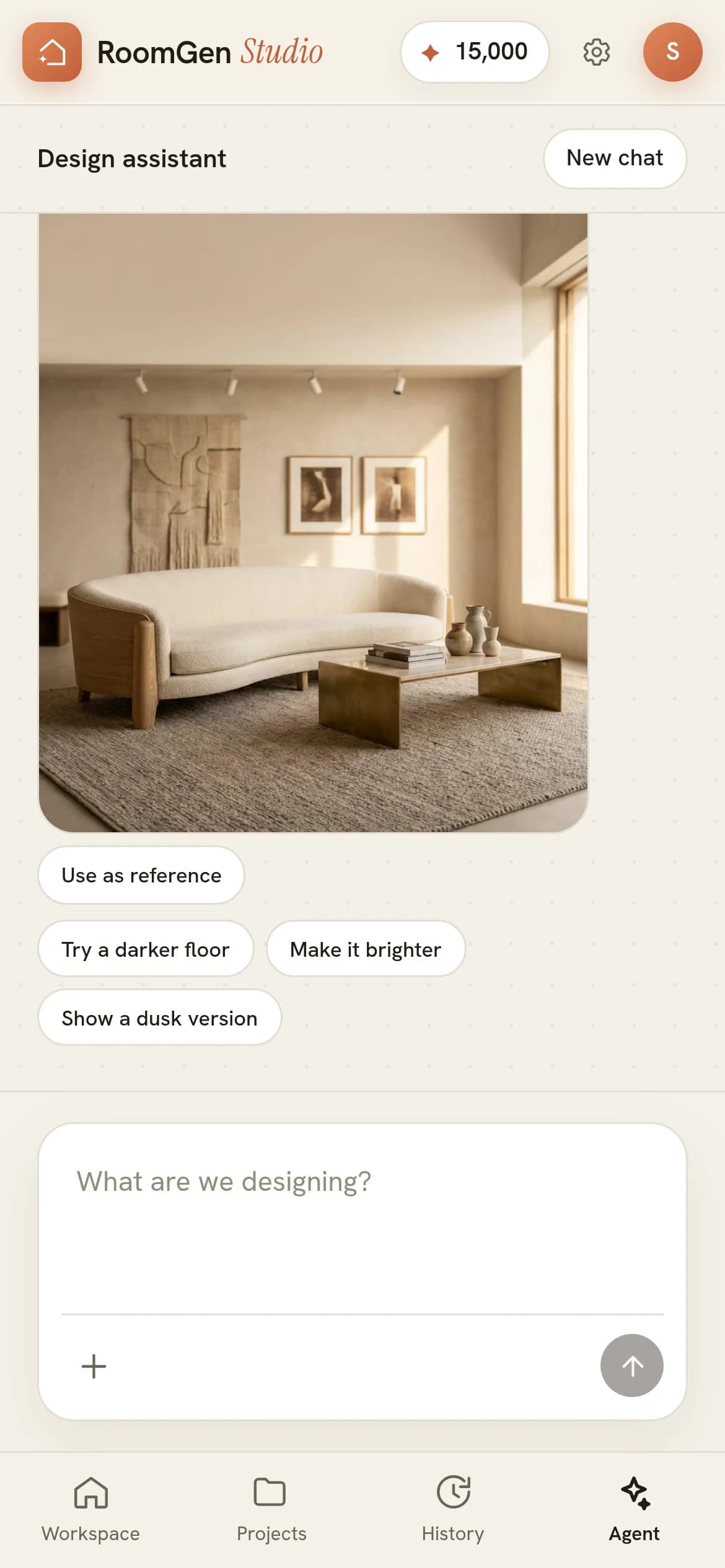
Tapping either the render or its reference pill opens a full-screen viewer holding every image in that conversation, the photos you attached as well as the renders that came back. Arrow keys and a swipe move between them, and a prompt box sits at the foot: what you type there goes out with the image you are looking at already attached. That is the whole mechanism behind working in passes. Pick the version that got closest, send it back in, and ask for the next change against it, so each turn starts from a room you have already approved instead of from the original photo again.
What a conversation costs
Talking is not what you pay for. The render is, at a price set by the quality you ask for, and it is the same price whether the request came from a sentence or from a form. A render keeps its tier's price or twice what it cost, whichever is more, so the table gives the usual price and the studio shows the most before you render.
| Output | Credits |
|---|---|
| Concept | About 21, at most 52 |
| Preview | 50 |
| Standard render | 70 |
| Hero | 150 |
New accounts open with 100 credits, which sets a sensible order of work: settle the direction at the bottom of the table, where a wrong turn is cheap, and spend once at the top on the version you are going to send. The per-photo arithmetic across a whole listing is in virtual staging cost per photo.
The conversation itself runs on a cheaper, faster reasoning model than the one orchestrating renders on the canvas, because most turns in a chat are a question rather than a picture. Image quality is untouched by that choice: the renders come from the image models inside the render tool, not from the model writing the reply. It also explains the pause before an answer, which is the model thinking rather than the network.
When a form beats a sentence
Type when you do not know which tool you want. Fill in a form when you do. The conversation is the better route when the tool has a name you have never heard, and the worse route when you know exactly which options you want set.
The Design Library cards on the home screen are the other door: each one opens a screen that collects the photo, prepares the prompt for you and seeds a project for the work, which the chat deliberately does not do. For a tool with real judgement calls in it, that structure earns its place, and removing furniture from a photo walks through one of them. The panel route inside a project, click by click, is in your first render.
One more limit worth knowing. The assistant can pass a question to a person, and it asks for your email address first because the answer comes back that way. It will not quote your balance, a charge or a billing rule at you, because it cannot see your account from the conversation, so anything it said about those would be a guess with your money attached.
The same box on a phone
Phones reach the conversation through an Agent tab in the bottom bar, which exists because the phone home screen opens on the tool grid rather than on a prompt box. Everything on this page works there: the attachment, the suggestions, the viewer and the reference pill.
Projects are editable on a phone as well. Four things stay on desktop, and none of them is the chat: floor plan upload, plan tracing, the map tools and Auto mode. Designing a room from your phone covers the camera-first route, and RoomGen on a phone covers the gestures and the panel itself.
Related: change the time of day in a render and AI furniture placement, which is worth reading before a render made this way goes to a client.
Common questions
Can I design a room just by describing it?
Yes, as long as the room is attached to the message. Type the change you want into the box on the home screen with a photo of the room on that same message, and the assistant runs the matching styling tool and posts the finished image back as the next message. Without a photo it still answers, but it answers in words: palettes, materials, proportion, what suits a north-facing room.
Does the agent only give advice, or does it change the picture?
It changes the picture. The assistant names one of the studio's styling tools and its settings, the studio looks that name up in the same catalogue the tool screens use and builds the same instruction the form would have built, and the image comes back in the thread. A name it cannot find, or an instruction with a blank left in it, is dropped before anything is charged.
Where does a render started in a chat end up?
In the thread, and in History with the rest of your renders. There is no link out into the studio and no file to collect. Renders made in a conversation are not filed under Projects, because asking for a picture in a conversation is not the same as starting a project.
How do I use one render as the reference for the next prompt?
Tap Use as reference under the image, or tap the image itself. Either opens a full-screen viewer holding every picture in that conversation, photos and renders alike, with a prompt box at the foot. What you type there is sent with that image attached, which is how the next render starts from the version you liked. A tapped suggestion pill sends words only, so it will not carry the picture for you.
Is the conversation saved?
No. A thread lives as long as the browser tab, and New chat discards it. The images outlast it: every render made in a conversation is kept in History, so the part worth keeping is already saved somewhere the words are not.
What does a render started in the chat cost?
The same as one started from a tool. The price is set by the quality you ask for, and the four levels are listed in the table on this page. Talking between renders is not what spends the balance; the images are.
Try it on your own plan
Upload a floor plan or a room photo and see the first renders in about thirty seconds.
100 free credits · no credit card required
Get the next guide when it lands
We publish these as we work through what people actually ask about pricing, staging and turnaround. Leave an address to hear when a new one goes up.
We only use your address to email you about RoomGen. Privacy policy · Terms