Shop opening reels: your shopfront, open for trade.
Business opens is the Reels template for shops, cafés, kiosks and food trucks. It starts on the unit shut, unlit and unbranded, then shows it opening: shutters or hatch up, sign lit, the place set out for customers. It makes one 8-second vertical clip that ends on the render your client already approved.
Updated · RoomGen Studio
What the Business opens template does
Business opens is the shop opening template among the nine in Reels, RoomGen Studio’s tool for vertical clips cut from a render. You give it one finished render of the business. It gives you one keyframe to review, “Closed, unbranded”: the same business before opening, shut and unlit, its sign blank, with no stock or furniture out. The reel then plays from that still to your render. The shutters or serving hatch open, the sign lights up and the place sets itself out for trade, finishing on your render as it was signed off.
The appeal for a designer is that the before needs no explaining. Everyone knows what a shut unit looks like, so the viewer’s attention goes straight to the change. Business opens is built to bring in only what your finished render contains, and the reel always ends on your render, so the last frame shows the chairs, planters, menu board and festoon lights you designed. The moments in between are still generated and can briefly show extra pieces: in the preview above, a table and chairs appear on the left partway through and are gone by the end. Watch the finished clip through once before it goes out.
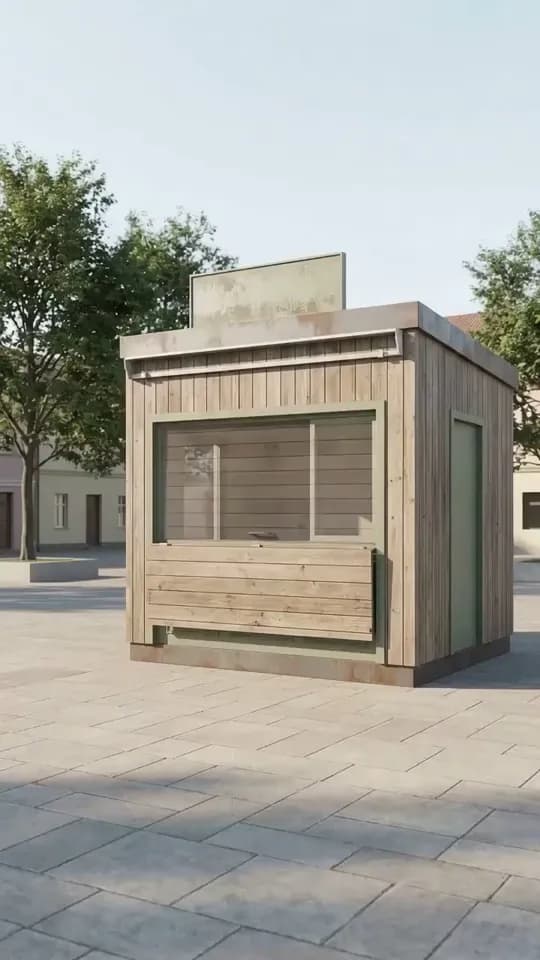
Closed, unbranded
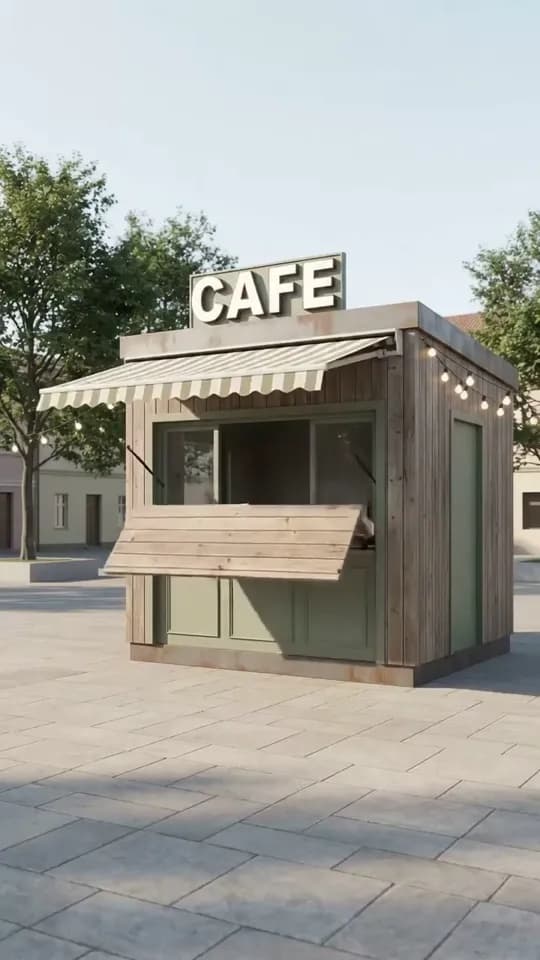
Opening
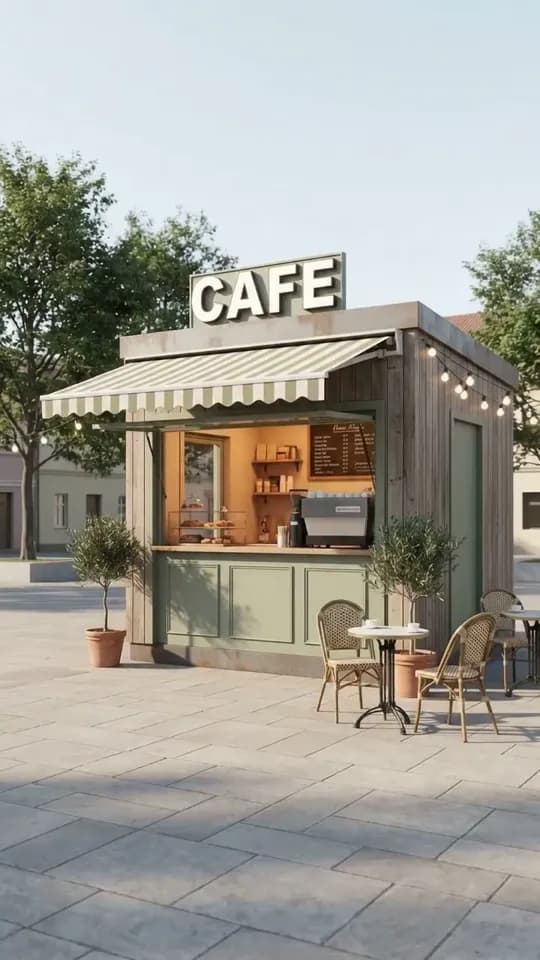
Open: your render
Almost everything about the template is fixed, which makes it quick to run.
| Business opens | What you get |
|---|---|
| Story | Closed and unbranded, to open for trade |
| Runs on | One finished render of a shop, café, kiosk or food truck |
| Keyframe to review | One: “Closed, unbranded” |
| Keyframe cost | 150 credits each time it is generated; nothing for your own still |
| Clip | One clip, always 8 seconds at 720p |
| Frame | 9:16 vertical; a landscape render is centre-cropped |
| Captions and music | Add them in the app you post from |
| Access | Paid plans; free demo on the sample project |
Which renders make a good shop opening reel
Renders that show the shopfront (the storefront, in American usage) work best. The reel is built around two moments: the shutters or hatch opening, and the sign coming to life. Choose a view with the serving side, the entrance and the fascia in plain sight. A three-quarter view from across the street or square, like the kiosk in the preview, is the natural setup. It shows the front, one side, and a strip of paving where your tables and planters stand.
If the inside of a café or shop is all you have rendered, a room template suits it better. The shutters and the sign are what this template turns on, and a view from behind the counter rarely shows either. A furniture fly-in reel brings the tables, chairs and fittings into the finished interior and settles them in place, which suits a café interior set for its first customers.
Then check the crop. Every reel is 9:16. A render made at 9:16 with the proportion picker goes into Reels uncropped, and a landscape render is centre-cropped to that shape. From a 16:9 still, that keeps roughly the middle third of the width. A compact kiosk, or a food truck shot at an angle rather than side-on, survives this easily. A long shopfront is where it goes wrong. A name that runs the full width of a landscape render loses its first and last letters once it goes vertical.
To test your own render, cover its outer thirds with two fingers. If the whole sign and the door are still visible, the render will survive the crop. If not, make a 9:16 version of the render with the proportion picker, check it still matches the version your client approved, and run the reel on that. Furniture can spill off the edge without harm, as the half-visible table on the right of the preview shows. The sign cannot.
Read the sign next. Business opens is built to keep the wording as it reads in the render, so a client’s name should come through as you designed it. It also means a misspelling or a smudged letter in the render can end up in the reel. If the lettering is wrong, fix the render first, and read the sign again in the finished clip.
Light is worth a thought too. A lit sign and a string of festoon bulbs read more strongly against an evening sky than in flat midday light. If the scheme leans on its lighting, consider moving the render to dusk as a separate still. Let the client approve that version before you run the reel on it.
How to make a shop opening reel in RoomGen Studio
Two choices come first, then a four-step wizard: Frames, Settings, Generate and Result.
- Open Reels and choose Business opens. Reels sits in the Video group of the studio sidebar. Pick the template from the panel, or press Expand to browse the whole template library.
- Choose the render. Pick the finished view of the business, the version you would send the client.
- Review the closed frame. The Frames step shows one keyframe, “Closed, unbranded”. Check it closely, regenerate it with a short instruction if something is off, or supply your own still, then confirm it.
- Check the total. There is no length or resolution to choose on the Settings step. The Generate button shows the exact credit total before you commit, with a count beside it of how many reels at that price your balance can pay for.
- Generate and collect. Press Generate when you are happy. If the clip fails, a Retry button appears beside it. The finished MP4 saves to the project’s Gallery, ready to download.
Nothing is spent on video until you press Generate, so the Frames step is the cheap place to be fussy. You can also close the wizard part way through. Reels offers a resume card when you come back, and anything already paid for is kept.
Checking the closed frame
The closed frame decides the reel, because the clip runs from that still to your render. Read it for continuity rather than atmosphere. It should show the same unit in the same place: the same cladding, door and roofline, with the sign board where it was and its lettering gone. The trees and buildings behind and the paving underneath should match too. If the building has changed shape, the opening will look like a cut to a different shop.
Then check that it is properly closed. Chairs left out front, a menu board still up, lettering on the sign or a hatch already half open all blunt the opening, because they leave less for the clip to reveal. Regenerate with a short, physical instruction in plain words, such as “take the tables away” or “keep the green side door”, and look again. Work out everything that needs changing before you ask, so one regeneration covers it.
You can also skip generation and supply a still of your own from the Gallery or as an upload, which costs nothing. If you modelled the unit yourself, a view rendered from the same camera with the shutters down and the fascia blank makes an exact closed frame. A photo of the real vacant unit works too, as long as it is taken from the same viewpoint as the render. A real photo does change how the reel should be captioned, which the section on limits covers.
Where a shop opening reel earns its place
It suits anyone who designs, fits out or sells commercial space, and it is most useful in four situations.
- Pitches and presentations. Showing a café owner their unit opening presents the scheme as a working business rather than a set of finishes. It also gives them something easy to share with a partner or a lender.
- Launch teasers. A client counting down to a grand opening can post the reel as a coming-soon teaser while the fit-out is still under way.
- Your own feed. Shopfitters, kiosk and food-truck builders and hospitality designers get a project in a shape made for a phone, with the approved render as the last frame.
- Vacant units. An agent or landlord can show one possible use for an empty shop. For marketing the property itself, a listing tour reel, which runs three to six renders of one property, is the better fit.
Starting from the render is what keeps all of this consistent. The reel ends on the image the client approved, so the post, the presentation and the drawings show the same shop. If the story you want to tell is the building work, the renovation reveal reel runs from a tired space through construction to your finished render. If you only want the camera to move around the finished shop, animating the render with a single camera move is the simpler route.
Posting the reel
The downloaded MP4 is already the vertical shape that Instagram Reels, TikTok and YouTube Shorts are built around, so it goes up without reframing. Captions, music and text overlays go on in whatever app you post from. That is also where you can see how the app’s own interface sits over the frame. The account name and caption usually run along the bottom, with the like, comment and share buttons down the right-hand edge. Layouts change, so preview the post in the app before it goes out.
Keep any text clear of both. In the preview, the CAFE sign sits in the upper third, below a band of open sky. Open paving fills the lower third, and only half of a second bistro table shows at the right-hand edge. That makes the paving, just above the bottom strip, the place for a line of text, and the sky above the sign leaves room for a short title. It also means the buttons on the right cover nothing that matters. Read your own frame the same way: where the sign sits, where the empty sky and ground are, and what the right edge holds. If the app lets you pick a cover frame, choose the open shot, since it says what the business is.
What Business opens will not do
The template is deliberately narrow. The story is always closed to open, in one clip, and the length and resolution are set for you. For more on screen, make a second reel from another render of the same project and join the two in the app you post from. It is also built not to add dressing your render lacks. An A-board, a menu or a row of planters has to be in the render before it can appear in the open shot.
A finished reel has no redo button, and Retry appears only when a clip fails outright. Say the clip completes but shows an extra table or a sign that was not in your render. The fix is a new Business opens run from the same render, and the clip is charged again. Before you pay twice, work out where the fault began.
- In the closed frame. A table left out or a hatch half open starts here, and the clip carries it through. In the new run, fix the frame on the Frames step before you press Generate.
- In the clip. If the closed frame and the render were both right, the fault arose in the clip itself. That includes lettering that changed even though your render reads correctly. Confirm a closed frame as clean as the last one and run it again. If you have a closed still of your own, supplying it means the frame costs nothing the second time.
A shop opening reel is design intent, not a record. Unless you supplied a photo, the closed frame is generated rather than photographed. The opening also squeezes a fit-out that may not have happened yet into 8 seconds. That suits a pitch, a portfolio post or a teaser. Next to a real business or a unit that is to let, or when a real photo is the closed frame, say in the caption that the reel shows a design proposal.
Start with the render your client is least likely to change. Then run the flow once on the free sample project to see how each step works, before you spend credits on a client’s shop.
This guide was written by the RoomGen Studio team against Reels as it works on 28 September 2026. You can read more about RoomGen Studio and how the team works.
Common questions
How is a shop opening reel priced?
In two parts. The closed frame costs 150 credits each time the studio generates it, including every regeneration, and nothing if you supply your own still from the Gallery or an upload. The clip is always one 8-second clip at 720p, so there are no length or resolution options to weigh up. On the Settings step, the Generate button shows the exact credit total before anything is spent on video, and a count beside it shows how many reels at that price your balance can pay for. If a finished clip needs redoing, the new run is charged again.
Will the reel change the name on my client’s sign?
It is designed not to. Business opens is built to keep the sign’s wording as it reads in your render, so the name that appears should be the name you designed. That also means a spelling mistake in the render stays in the reel, so correct the render first. Read the lettering in the finished clip before it goes to a client.
Can I use a photo of the empty unit as the closed frame?
Yes. On the Frames step you can supply your own still from the Gallery or as an upload instead of generating one, and that costs no credits. Take it from the same viewpoint as the render so the reel reads as one place. Then caption the result as a design proposal, since a real before with a rendered after looks like a record of finished work.
Does Business opens work for a food truck or a market kiosk?
Yes. The template is made for shop, café, kiosk and food-truck renders. For a truck, choose a view with the serving hatch and the signage facing the camera. An angled view works better than one square to the long side. Every reel is 9:16 and a landscape render is centre-cropped, so a truck shot side-on loses its ends. Keep the vehicle inside the middle third of a landscape render, or make a 9:16 render of it with the proportion picker.
Can I try Business opens before paying for a plan?
Reels is on paid plans, but the sample project in RoomGen Studio runs the whole Reels flow free as a demo. It walks you through the Frames, Settings, Generate and Result steps, so you know how each one works before you commit one of your own renders. To see what Business opens itself makes, watch the preview clip on this page.
Try it on your own plan
Upload a floor plan or a room photo and see the first renders in about thirty seconds.
100 free credits · no credit card required
Get the next guide when it lands
We publish these as we work through what people actually ask about pricing, staging and turnaround. Leave an address to hear when a new one goes up.